Quick Summary
Summarize this article instantly with your preferred AI model.
LinkedIn Ads Account Structure & Naming Convention for B2B SaaS
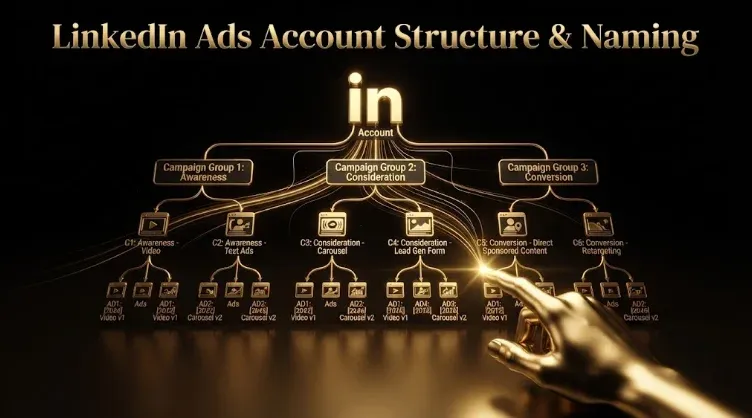
LinkedIn Ads Account Structure & Naming Convention for B2B SaaS
A clean LinkedIn Ads account structure isn’t housekeeping — it’s what lets you see what’s working, allocate budget to pipeline, avoid audiences competing against each other, and scale without your reporting turning into guesswork. The pattern is simple: organize campaigns into campaign groups by funnel stage, allocate budget deliberately across those stages, run one audience per campaign, lock a fixed naming convention (at both the campaign and ad-set level) from day one, and turn off the two settings LinkedIn enables by default that quietly waste budget. Nobody notices a bad structure on day one; you notice it at campaign fifteen, when reporting is broken, audiences overlap, and you can’t tell which campaign drove the pipeline. This guide covers the hierarchy, the budget split, the naming convention, and the defaults to kill.
Key takeaways
- Structure by funnel stage — campaign groups for cold prospecting, warm retargeting, and testing.
- Allocate budget deliberately across stages — most accounts over-index on awareness; weight toward pipeline.
- Run one audience per campaign, and name at both the campaign and ad-set level with a fixed convention.
- Turn off two defaults — Audience Expansion and the Audience Network are on by default and waste budget.
- Structure exists to measure pipeline — clean data by campaign is what lets you optimize on cost per SQL.
The campaign-group hierarchy
LinkedIn’s hierarchy is Campaign Groups → Campaigns → Ads (the layers were recently renamed, but the three-level logic holds). Use the top level to organize by funnel stage — the principle that maps to how you’ll manage budget and read performance. A clean starting structure is three groups: cold prospecting, warm retargeting, and testing. Within each group, each campaign holds one audience segment. This keeps budget allocation legible and performance readable by stage.
There’s no fixed number of campaigns — a focused B2B account often runs five to eight active ones, not dozens. Resist sprawl: more campaigns than you have distinct audiences for is a sign the structure has drifted. The most common scale failure is collapsing the audience decision into the campaign-group layer, which is how teams end up running five campaigns against overlapping audiences because nobody mapped the account out first.
Budget allocation by funnel stage
Structure and budget go together: once you’ve organized by stage, allocate deliberately, because most accounts over-index on top-of-funnel awareness and starve the stages that produce pipeline. Weight budget toward the stages that drive qualified pipeline for your motion (typically a meaningful share to warm/retargeting and conversion, not everything to cold awareness), and hold the split at the campaign-group level so it’s visible and adjustable. Use a concrete trigger to rebalance: when your awareness audiences are getting fatigued — frequency climbing to roughly 6–8 over 30 days — shift budget up-funnel to refill the top; otherwise keep weighting toward capture. The point is that the campaign-group structure isn’t just organizational — it’s the control surface for allocating budget across the funnel and seeing, at a glance, whether your spend matches where pipeline actually comes from.
One audience per campaign
The most common structural mistake is stacking multiple targeting dimensions into one campaign — job title plus function plus skills plus a company list — which makes it impossible to tell which is working. Run one primary targeting dimension per campaign and test them separately:
- Job title — precise but brittle (title conventions vary by company size and region).
- Job function + seniority — broader, more stable; often outperforms title targeting at scale.
- Skills — underused; self-reported skills correlate well with actual responsibilities.
- Company list — upload a CSV of target accounts; pairs with account-based motions (expect higher CPMs).
Running each as its own campaign lets you see which targeting approach produces pipeline, then concentrate budget there. Keep at least two ad variants live per campaign so creative decisions come from data. Mind audience size: the practical minimum for a prospecting campaign is roughly 50,000 members — below that, reach is constrained and CPMs spike (named-account campaigns are the deliberate exception).
The naming convention (campaign and ad-set level)
A naming convention needs a fixed set of fields in a fixed order so anyone can scan a name and know what it does without opening it — and it applies at both the campaign and ad-set level. At the campaign level, include at minimum objective, audience, geography, format, and date. At the ad-set level, name by audience type, lookback window, industry, geography, date, and (for ABM) company. Keep under LinkedIn’s 50-character limit and use a consistent delimiter — pipes (|) work well because they’re uncommon in names and split cleanly into spreadsheet columns.
| Level | Fields | Example |
|---|---|---|
| Campaign | Objective | Audience | Vertical-Geo | Format | Date | CVR|VP-Mktg|SaaS-NA|SingleImage|2026Q2 |
| Campaign | (retargeting) | RTG|WebVisitors|All-NA|SingleImage|2026Q2 |
| Ad set | Audience | Lookback | Industry | Geo | Date | WebVisitors|90d|SaaS|NA|2026Q2 |
Lock the convention in a shared doc, and if you use campaign templates, bake the naming into the template so new campaigns inherit it. Renaming is low-risk — it changes a label, not a setting — so there’s no reason to let a messy account stay messy; the accounts that stay clean are the ones where someone owns the convention like they’d own a budget.
The defaults to turn off
Two settings are enabled by default and quietly waste budget: Audience Expansion (which broadens your audience beyond who you targeted) and the LinkedIn Audience Network (which serves your ads on third-party apps and sites off LinkedIn). Both dilute the precise targeting that is the entire reason to use LinkedIn, spending your budget on people and placements you didn’t choose. Unless you’ve deliberately decided to use them, turn both off at launch — check your current campaigns now, because they’re almost certainly on. This one step protects a meaningful share of budget and keeps your audience data clean.
Why structure matters at scale (and keeping it clean)
Structure pays off most as you grow. Reporting: a consistent structure and naming convention means you can pull a clean report and know what each campaign did — past ten campaigns, without it, reporting becomes guesswork. Audience overlap: mapping audiences to campaigns deliberately prevents several campaigns competing (and inflating CPMs) against the same people. Multi-region/multi-brand scale: campaign-group sprawl is usually driven by budget ownership crossing regions or brands, and a documented structure prevents duplicate-audience spend and broken attribution across them — while feeding cleanly into any tool that normalizes cross-channel reporting. Keep it clean with a light audit every six to eight weeks: confirm audiences haven’t started overlapping, that budget still reflects funnel performance, and that naming has stayed consistent. Structure isn’t a one-time setup; it’s a discipline someone owns — and it exists so you can measure pipeline by campaign and optimize on cost per SQL, which a messy account makes impossible.
Frequently Asked Questions
Q1. How should you structure a LinkedIn Ads account?
Organize by funnel stage into campaign groups — typically cold prospecting, warm retargeting, and testing — with one audience segment per campaign inside each group and at least two ad variants per campaign. Allocate budget deliberately across the groups (most accounts over-index on awareness; weight toward pipeline). A focused B2B account often runs five to eight active campaigns, not dozens. The structure is both organizational and your control surface for budget, so it should map to how you manage spend and read performance by stage.
Q2. How should you allocate LinkedIn Ads budget across the funnel?
Deliberately, and usually with more weight toward capture than most accounts give it — most over-index on top-of-funnel awareness and starve the stages that produce pipeline. Hold the split at the campaign-group level so it’s visible and adjustable, and rebalance on a trigger: when awareness audiences fatigue (frequency roughly 6–8 over 30 days), shift budget up-funnel to refill the top; otherwise keep weighting toward warm/retargeting and conversion. The campaign-group structure is what makes this allocation visible and controllable.
Q3. What should a LinkedIn Ads naming convention include?
A fixed set of fields in a fixed order, at both levels. Campaign level: objective, audience, geography, format, and date. Ad-set level: audience type, lookback window, industry, geography, date, and (for ABM) company. Keep under the 50-character limit and use a consistent delimiter like pipes, which split cleanly into spreadsheet columns — e.g. CVR|VP-Mktg|SaaS-NA|SingleImage|2026Q2. Lock it in a shared doc and bake it into campaign templates so new campaigns inherit it automatically.
Q4. Should you run one audience per campaign on LinkedIn?
Yes — stacking multiple targeting dimensions into one campaign makes it impossible to tell which is working. Run one primary dimension per campaign and test them separately (job title, function + seniority, skills, company list), so you can see which produces pipeline and concentrate budget there. Keep at least two ad variants live per campaign for data-driven creative decisions, and keep prospecting audiences above roughly 50,000 members so reach isn’t constrained (named-account campaigns are the deliberate exception).
Q5. What LinkedIn Ads settings should you turn off?
Two on by default that waste budget: Audience Expansion (broadens your audience beyond who you targeted) and the LinkedIn Audience Network (serves ads on third-party apps and sites off LinkedIn). Both dilute the precise targeting that’s the reason to use LinkedIn, spending budget on people and placements you didn’t choose. Unless you’ve deliberately opted in, turn both off at launch — and check existing campaigns, because they’re almost certainly enabled.
Q6. How do you structure a LinkedIn account across regions or brands?
Use campaign groups to separate the stages within each region/brand, and document the structure and naming so budget ownership crossing regions doesn’t create sprawl, duplicate-audience spend, or broken attribution. The common failure is collapsing the audience decision into the group layer, which leads to overlapping audiences across campaigns. Map the account out ahead of time, apply a consistent naming convention (with region/geo as a field), and lock it in a shared doc so multi-region teams stay aligned and reporting normalizes cleanly.
Q7. How many campaigns should a B2B LinkedIn account have?
No fixed number — it depends on how many distinct audiences and objectives you’re targeting — but a focused B2B account often runs five to eight active campaigns. More than you have distinct audiences for signals sprawl and usually means audiences are overlapping. The principle is one audience per campaign within funnel-stage groups, so the count follows from your actual number of distinct audiences and objectives, not from a target number. If you’re past a dozen and can’t cleanly report, the structure has drifted.
Q8. Why does account structure matter for LinkedIn Ads?
Because it determines whether you can see what’s working and control where budget goes. A clean structure and naming make reporting legible, prevent audience overlap (campaigns competing and inflating CPMs), protect attribution at scale, and serve as the control surface for allocating budget across the funnel. Ultimately it exists so you can measure pipeline by campaign and optimize on cost per SQL — which a messy account makes impossible. Structure is the foundation for budget discipline and everything downstream.
More Featured Blogs
View All Blogs
LinkedIn Revenue Attribution Report: Tie Ad Spend to Pipeline



LinkedIn Dynamic Ads: Spotlight and Follower Ads Explained

LinkedIn Ads Reporting: How to Read Campaign Manager